Practical karaoke · Connection guide
Connect Karaoke Machine to TV: HDMI, RCA and Lyrics
Start with the equipment you already own. This guide covers three connection directions, with manufacturer examples and an original route selector. It is a setup guide, not a product ranking or a hands-on hardware test.
Choose the direction before choosing a cable
First decide where the song and lyrics will start. Will you press play on the karaoke machine, or in an app on the TV or a computer? Write that device down as the source. Then identify the screen and the speaker you want to use. A diagram with those three names is more useful than a cable selected only because its plugs look familiar.
| Your starting point | Route to check | Confirm before connecting |
|---|---|---|
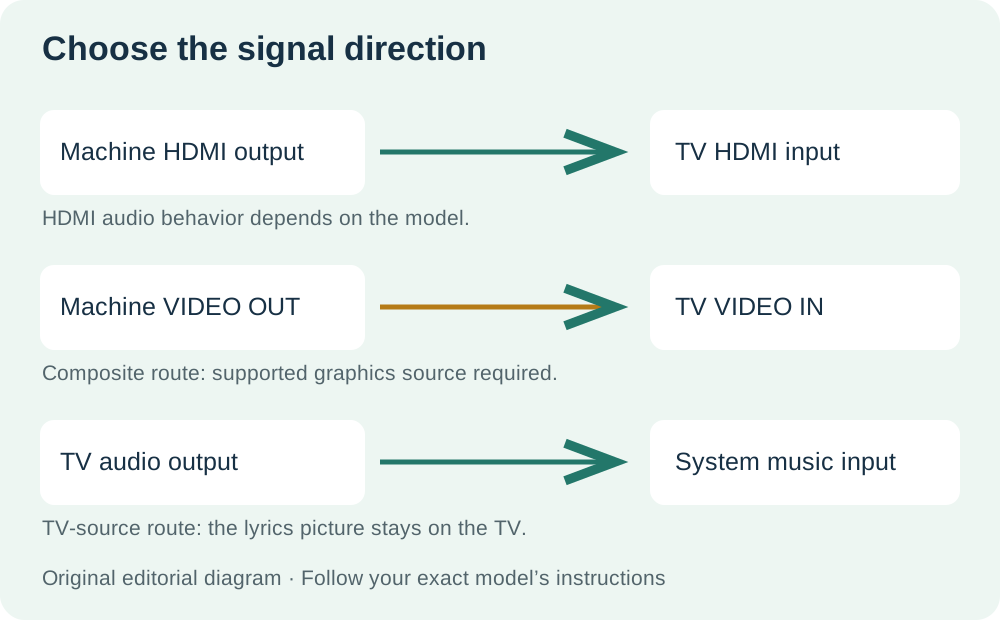
| Machine has a documented HDMI video output | Machine → TV HDMI input | What the model sends: lyrics, audio, or both |
| Machine has yellow composite VIDEO OUT | Machine → TV composite VIDEO IN | TV has a compatible input; song has supported graphics |
| TV or computer plays the lyrics video | Video stays on TV; music goes to system’s music input | Compatible source audio output and system input |
HDMI: a karaoke machine that hooks up to TV
Use this route only when your machine documents TV video output over HDMI. For example, Singing Machine’s iSM9010 instructions specify a cable from the unit’s HDMI port to a TV HDMI input, then selecting that input on the TV. On this model, HDMI sends video and lyrics; music and microphones do not play through the TV. The built-in speaker, or external speakers connected to Line Out, handles audio.
- Find your exact model’s TV connection section.
- Connect its specified HDMI video output to a TV HDMI input.
- Select the corresponding HDMI input using the TV remote.
- Open a supported song source on the machine and confirm the lyrics display.
- Use the speaker path documented for that model.
Record the TV input number before you move on. Do not extend the iSM9010’s video-only behavior to every HDMI karaoke product; check the instructions for yours.
Where does a karaoke machine plug into TV with RCA?
For the Singing Machine SML682BT, connect yellow VIDEO OUT to the TV’s VIDEO IN. Connect white and red AUDIO OUT to the corresponding TV AUDIO IN for this documented TV-audio route, then select AV or Video on the TV. Supported CD+G discs and compatible MP3+G files from USB can supply lyrics. Bluetooth and Line-In do not supply TV graphics on this model.
- Check that both sets of sockets have the required OUT and IN labels.
- Match yellow for video, white for left audio and red for right audio.
- Select the connected AV input on the TV.
- Play a supported lyrics track from the machine.
These are model-specific instructions. Use them as an example of a documented RCA route, not proof that every machine or every track supplies lyrics.
If the machine has RCA but the TV has only HDMI
The conversion direction is composite source → HDMI display. An example is StarTech’s VID2HDCON2: its quick-start guide specifies composite video and left/right RCA audio inputs, an HDMI output, a power connection and a video input selector. With devices off, connect the source to its input side and the TV to its output side; follow the guide for power and input selection. An HDMI-to-composite product describes the opposite direction.
Check a converter’s stated inputs, output and supported formats against both devices before choosing it. This is an explanation of the route, not a claim that we tested that converter with your karaoke machine.
A karaoke system that hooks up to TV when the TV plays the song
In this arrangement, the TV displays the lyrics and supplies music to the karaoke system. The Singtrix support FAQ documents a TV audio output feeding the console’s 3.5 mm music input. It also lists computer HDMI video to a TV alongside a separate computer headphone-audio connection to the console. For a TV without an analog headphone output, its FAQ describes optical or coaxial digital-to-analog conversion and an RCA-to-3.5 mm connection to the music input. Follow the requirements of your exact equipment.
Pick one documented arrangement before connecting anything. Label your drawing “TV is source” or “computer is source” so you do not confuse this direction with the machine-to-TV routes above. An audio connection here supplies the music path; the TV already has the lyrics picture.
Karaoke that connects to TV with lyrics: identify the lyrics source
For a karaoke machine that connects to TV with lyrics, the connection and the song source must work together. The SML682BT example uses supported disc or USB graphics; the iSM9010 example uses its supported on-device song source. In the TV-source arrangement, the TV or computer supplies the lyrics video. These are different setups, even though each ends with words on the same television.
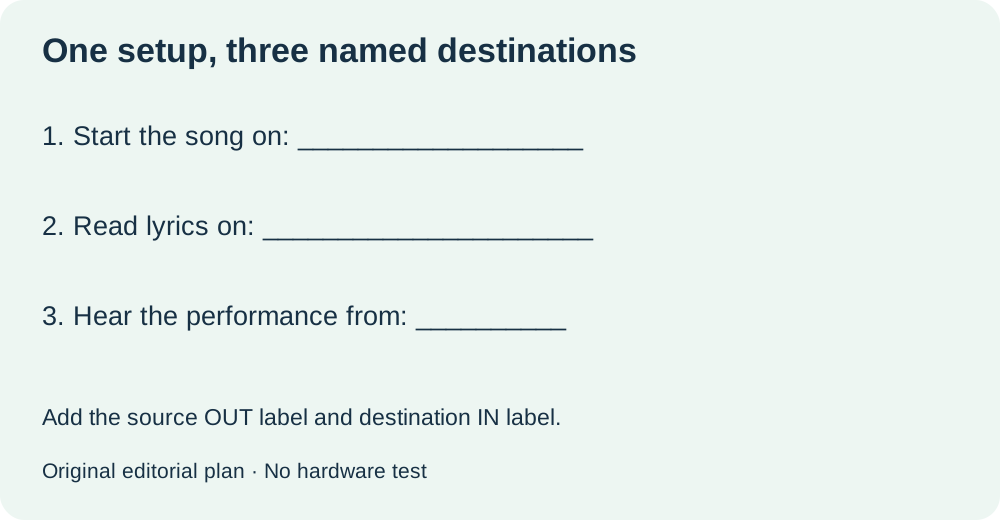
Describe the result you want in one sentence: “I will start the song on ___, read lyrics on ___, and hear the performance from ___.” Fill all three spaces before buying a cable. If one is undecided, keep the plan unfinished rather than assuming the TV will perform every role.
Make a connection plan you can use immediately
Use this original three-line plan next to your equipment. Copy labels from the devices and the relevant manual, not from a similar-looking online picture. Keep video and music on separate lines even if your eventual setup uses one cable. That makes the plan readable when another person helps you connect it.
| What to decide | Fill in your setup |
|---|---|
| Song and lyrics start here | Device ___ / app, disc or file ___ |
| Picture goes here | Source output ___ → TV input ___ / remote input name ___ |
| Performance is heard here | Speaker device ___ / manual’s audio route ___ |
For each line, write the model and manual section that supports it. Mark a line “confirmed” only when you have read the relevant instructions; otherwise write “needs checking.” This is a planning status, not a report that equipment has passed a test.
Connect in a deliberate order
- Choose one route. Cross out the alternatives on your drawing. Keeping several competing arrows makes it easy to connect the right cable to the wrong destination.
- Match the written endpoints. Read the output label on the source and the input label on the destination. Add a converter only if its documentation bridges those particular endpoints.
- Follow the power and connection order in the manuals. Keep both manuals available rather than relying on a generic sequence for every product.
- Select the named TV input. Use the number or AV label you recorded, then start the supported song source you chose.
- Complete a short rehearsal. Confirm where lyrics appear, where music plays and where your microphone is heard. Write your observations separately from the manufacturer’s stated behavior.
Your finished note should be specific enough to repeat: “Song source ___; TV input ___; speaker ___; cables ___.” Save it with the equipment. If you change the source device or television later, revise the affected line instead of treating the old plan as a universal setup.
Know when the plan is not ready
If you cannot identify a documented video route from the machine, leave the machine-to-TV line blank. Check whether a TV-source arrangement is supported instead. An unresolved compatibility question is a reason to consult the exact manual or manufacturer, not to fill the gap with a guessed cable.
Watch the three connection routes
Original editorial diagrams with synthetic English narration. No hardware demonstration or equipment test.
Quick answers
Does a Bluetooth connection put lyrics on the TV?
Not in the SML682BT example: the manufacturer documents Bluetooth as audio input, without TV graphics. Check the video features of your particular model.
Will HDMI always put the microphone through TV speakers?
No. The iSM9010 instructions explicitly keep audio and microphones off the TV HDMI path. Read the audio routing for your model.
Can the TV stay on lyrics while the karaoke system handles music?
Yes, when the devices support that arrangement. Singtrix documents TV audio feeding its music input; that is a separate direction from machine video going to TV.
Sources checked 17 October 2026: the linked SML682BT and iSM9010 manufacturer support pages, Singtrix support FAQ and StarTech VID2HDCON2 guide. Route selector, connection plan, diagrams and rehearsal sequence are original editorial material. Manufacturer examples are limited to the named models; no equipment was physically tested.