JBL Karaoke Speaker: Music Plays, but the Microphone Is Silent
This guide is based on JBL’s published support instructions. The diagrams and troubleshooting worksheet are original editorial tools, not results from a hardware test. Follow the manual for your exact model; On-The-Go, On-The-Go Essential and On-The-Go 2 are different products.
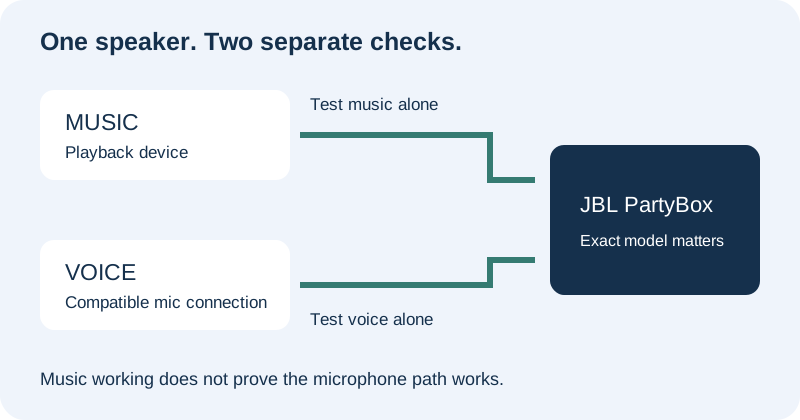
First, write down the connection you actually have
Before changing settings, make a three-line inventory: the full speaker name, the microphone name, and what is plugged into the speaker. Photograph the rear panel if the input labels are hard to read. Do not shorten the product name to “JBL speaker”: that hides the very distinction you need for the next step.
Use this small checklist as a record rather than a compatibility promise. Write “unknown” beside anything you cannot identify, then check the product manual before connecting it.
| Question | Your observation |
|---|---|
| Exact speaker model, including Essential or generation number? | ________________ |
| Bundled wireless mic, separate wireless set, or wired mic? | ________________ |
| Receiver present? Which labelled socket does it use? | ________________ |
| Music plays with the microphone switched off? | Yes / No / Not checked |
| Voice audible with music paused? | Yes / No / Not checked |
Check the microphone arrangement before repeating phone pairing
JBL’s Wireless Microphone Information describes a separate wireless microphone set using a receiver in the mic input. It also lists different microphone arrangements by PartyBox model. The original On-The-Go’s bundled microphone is restricted to its supported On-The-Go connection; it is not a universal wireless mic for other JBL portable speakers. Check the table for your model before buying an extra microphone or receiver.
Our diagnostic rule is simple: once music works, stop changing the music route while you test voice. Pause the track, try the supported microphone arrangement, and write down what changes. If you change the phone connection, microphone and receiver together, a successful result tells you little about which change helped.
Original PartyBox On-The-Go: retry the bundled microphone connection
JBL’s Microphone Pairing and Behavior provides this recovery sequence for PartyBox On-The-Go:
- Switch the speaker off.
- Switch the microphone on and position it on top of the speaker.
- Start the speaker again.
- Allow up to three minutes for automatic pairing and listen for its connection notification.
That time window belongs to JBL’s On-The-Go procedure. It is not a pairing deadline for every PartyBox. JBL also notes that an out-of-range microphone may lose sound and reconnect after returning within range. Distinguish a mic that never connects from one that connects and then drops out.
Use a stop-and-record test, not a shopping list
The following sequence is our original worksheet. It keeps the question narrow: at which check does your intended setup stop working? It does not diagnose a particular hardware defect.
| Check | What to record | Next action |
|---|---|---|
| Music alone | Track audible or silent; playback device used | If silent, investigate playback first. Do not label it a microphone failure. |
| Voice alone | Track paused; voice audible or silent | If silent, identify and verify the mic arrangement against the model manual. |
| After the supported pairing procedure | Notification heard? Voice now audible? | Keep the same playback arrangement and record the outcome. |
| Voice and music together | Which signal becomes difficult to hear? | Use the controls documented for this model, making one adjustment at a time. |
| Moving to the intended singing position | Voice stays present, drops out, or was never present | For dropouts, return closer and compare. Report the observation rather than guessing the cause. |
What should you send support if it remains silent?
Copy your inventory and test notes into a short message: “Speaker model: __. Mic model: __. Connection: __. Music-alone result: __. Voice-alone result: __. Model-specific pairing result: __.” Add whether a connection notification occurred. This gives support a repeatable description without claiming that the mic, speaker or phone is defective.
Quick answers
Does hearing music prove my microphone is connected?
No. Treat music and voice as separate checks. JBL’s model-specific microphone arrangements explain which voice connection to check; music playback alone cannot confirm it.
Should I buy a second microphone first?
First identify the exact model and the supported microphone arrangement. Use the official compatibility table rather than assuming that two products carrying the JBL name can pair directly.
Does this guide apply unchanged to On-The-Go 2?
No. The re-pairing sequence above is for the original On-The-Go support article. Check the newer model’s own manual instead of transferring a procedure solely because its name looks similar.
Sources checked 8 October 2026. No hardware was tested for this article. The original contribution is the two-path diagram, connection inventory, single-change test sequence and support worksheet.